Today, my school district hosted a professional development day centered around Universal Designs for Learning (UDL). For these sessions, I was very interested in listening in to what my district’s stance on the use of AI is. The last conference I attended (CUEBC), the presenter from West Vancouver school district was very skeptical about bringing AI into the classroom at this point in time. I have been implementing the use of AI tools into my practice when it comes to lesson planning, but I haven’t put the same very tools into the hands of my students yet. I’m curious as to what the district team will encourage us to try, and be cautious of. I enrolled in 2 workshops, both of which were on the integration of AI in the classroom through the lens of UDL.
Gavin Hanna is one of the STEAM support teachers in my school district, Carol Todd is the Supportive Technologies and Digital Literacy (Citizenship) Coordinator, and Cheryl Angst is a middle school teacher in the Middle Age Cluster Classes (MACC) program. Together, their intention for the workshop was to inform staff on the use of AI in order to support UDL efforts – how will it impact teaching with UDL in mind and how will it impact student learning?
One of the biggest considerations to take into account when keeping UDL in mind while utilizing AI is to generate prompts that are specific enough to encourage critical thinking in students, rather than looking for a quick answer to a surface level question. Gavin suggested the graphic below from our district SharePoint site to help with making a prompt effective:
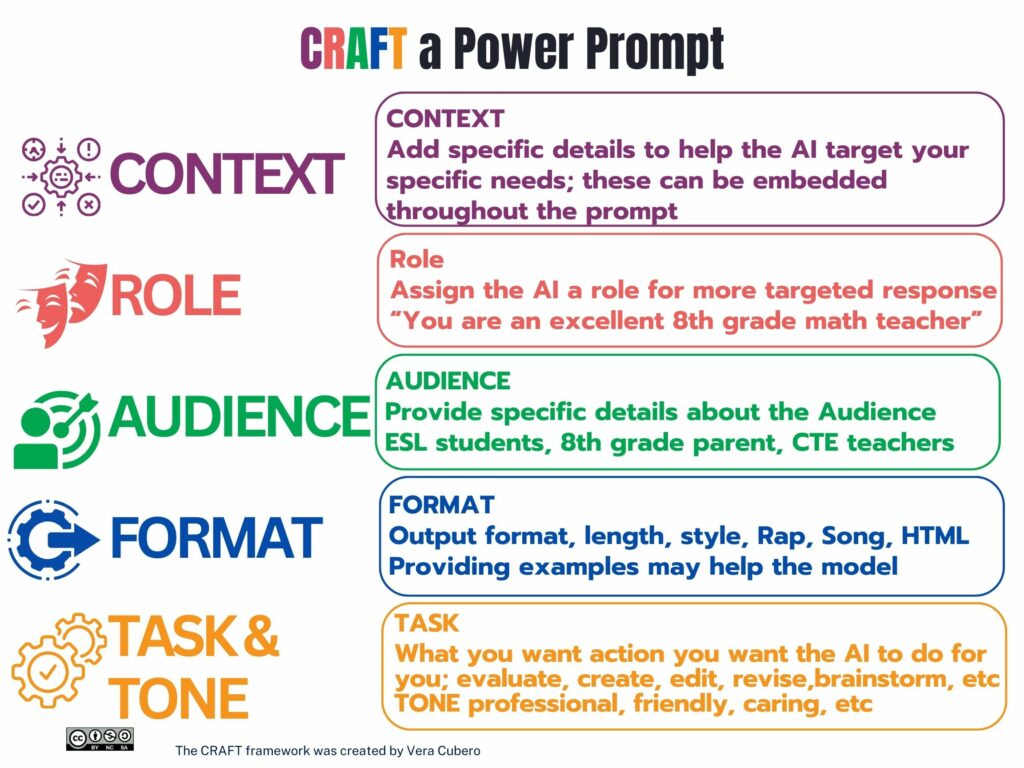
- be specific in what you want
- use the appropriate model for the task (do you need the output to be more creative? More precise? or does it need to be a balance of both?)
- ask for results through the lens of a certain point of view
- guide the model to generate to the desired length
- refine the output with iterative prompting
When working with AI to develop UDL supports, Gavin suggested that we work together with the system to look for opportunities to input student voice and choice into their learning tasks, identify universal supports that could benefit everyone, and address specific accessibility requirements (without delving into private student information). To conclude our UDL lessons for students, Gavin also mentioned that we could use the AI systems to help us with developing reflection questions, student prompts, and templates that connect to the core competencies and our proficiency scales. We were then given the rest of the session to try out Microsoft Co-Pilot and see if we could make something useful to our classes with it while Cheryl and Carol discussed how we as teachers need to be critical of the responses AI can give us. The talking points we very similar to the points made by Dr. Couros in my last post.
Reflecting on this workshop, it was a good introduction to AI for teachers who have not had a chance to use our district-supported version of Microsoft Co-Pilot. Having some educators who were familiar with the system on hand to help with questions in real time was very useful to the staff trying it out for the first time. I spent the work period exploring what Co-Pilot had to offer in terms of being a unique AI. Through exploration with Gavin’s prompts and my own, I learned that Co-Pilot was very strong at providing factual information with citations to the references (like when looking for content), while Chat GPT was more weighted to creative outputs (like creating the workflow).
I decided to stick around for the second session with Gavin, but this time, he was joined by another member of the STEAM support team, Brian Healey. In the first session, we briefly touched on student choice, AI, and UDL, so I was eager to see examples of prompts or ways that it has been integrated into practice.
*Update* I was really disappointed in this workshop, as it was not clear that it was a repeat of the morning session. The same slides, the same talking points, and relatively the same prompts to try and work through. I was expecting to learn how to use AI to help manage work cycles like the Daily 5, or even Montessori style work cycles (i.e. making sure there were materials and resources available at every level in the class without teachers wasting precious time to filter and find it all). I used this time to play around with the latest feature that Bing’s Co-pilot is starting to rollout – the notebook. The Bing Co-pilot notebook is a larger workspace for your AI-assisted needs. Regular Co-pilot has a prompt character limit of 4000 characters, while Co-pilot notebook has a 18,000 character limit. As of now, I am capped at 30 responses to each topic, so I continued to play with my unit plan idea and the concept of developing a rubric that I had started a few weeks earlier when I was learning about effective prompting with Dr. Alec Couros. I really enjoyed how the notebook was laid out and how easy it was for me to download, copy, and export any responses. I have so far made a very bare-bones unit plan with a rubric that I am looking to make amends to and really customize for some in-class application.
My interests currently lie in trying to use AI to help me develop my unit plan on BookCreator. Last year, I took some professional develop coursework on the platform and got certified as a “Certified Author”, but I didn’t have access to the full license of the program. My district library services team reached out recently asking if any teacher-librarians were interested in using a district license for this school year. Of course I jumped at the opportunity and I have been consulting with my colleagues as to when they are doing story writing in their Language Arts courses, and we can work collaboratively and cross-curricularly to create e-book versions of stories students have created. As of now, having AI help me design a unit plan and rubric on BookCreator has been difficult. I believe the caveat is that AI does not know the ins and outs of what BookCreator can do, and therefore cannot make more program specific suggestions. All of the inputs so far have been very generic and don’t always align with the program’s capabilities.
If I continue to use AI to assist in unit planning, I believe my next steps are to see what I could revamp in my tried and true units on Microsoft office. My students love the learning activities they are asked to do such as learning to label pictures, make lists, and show off text features, but I’d love to see what AI can help me with in terms of UDL and making sure these lessons are more accessible to all of my learners.
Leave a Reply